Message Board

What's your say ??? Send Message Here.
--------------------------------------------------------------
Showing posts with label Problems. Show all posts

Tuesday, May 14, 2013

Why Windows Kernel Slower is Than Other OS – Anonymous Microsoft Dev Says

Bookmark and Share

Why Windows Kernel Slower is Than Other OS – An Anonymous Microsoft Dev Says

Hello Friends,

Do you ask a common questions all the time that Why Windows is slow ? or Why my PC is slowing down after some days even if there is very minimum apps or file in my PC ? This is the regular case whether you use Laptop, Desktop or High end / High configuration Computer.

Yes this is the common question, that everyone asks on computing. As a IT Pro We face this question daily, and a major headache and challenge in the profession. But there is no specific answers from any IT Pro or from Microsoft. The answer may be many or may be one ? But what is the real/true reason behind it is still unknown and to be found out. There are many discussions on the internet and on offline. Few days ago there was a long discussion on CNET (Why do all Window systems slow down over time?). But have may reasons at last.

The Design and Development of the Windows OS is questionable many a times, in this scenario. Comparing to other OS, it is true that Windows is Slower than other (Linux, Mac etc.) in many cases.

Here is the recent post by an anonymous Microsoft developer, describing the causes of the issue from the development point of view.

The post was 1st published on (Microsoft dev explained in a comment) Hacker News, (then deleted, and reposted on Zorinaq.com). Just read through it to know more, why Windows “is indeed slower than other operating systems in many scenarios, and the gap is worsening”.

SlowerWindows

--------------------Read the Full post below-------------------------------

"I Contribute to the Windows Kernel. We Are Slower Than Other Operating Systems. Here Is Why."

I was explaining on Hacker News why Windows fell behind Linux in terms of operating system kernel performance and innovation. And out of nowhere an anonymous Microsoft developer who contributes to the Windows NT kernel wrote a fantastic and honest response acknowledging this problem and explaining its cause. His post has been deleted! Why the censorship? I am reposting it here. This is too insightful to be lost. [Edit: The anonymous poster himself deleted his post as he thought it was too cruel and did not help make his point, which is about the social dynamics of spontaneous contribution. However he let me know he does not mind the repost at the condition I redact the SHA1 hash info, which I did.] [Edit: A second statement, apologetic, has been made by the anonymous person. See update at the bottom.]

"""

I'm a developer in Windows and contribute to the NT kernel. (Proof: the SHA1 hash of revision #102 of [Edit: filename redacted] is [Edit: hash redacted].) I'm posting through Tor for obvious reasons.

Windows is indeed slower than other operating systems in many scenarios, and the gap is worsening. The cause of the problem is social. There's almost none of the improvement for its own sake, for the sake of glory, that you see in the Linux world.

Granted, occasionally one sees naive people try to make things better. These people almost always fail. We can and do improve performance for specific scenarios that people with the ability to allocate resources believe impact business goals, but this work is Sisyphean. There's no formal or informal program of systemic performance improvement. We started caring about security because pre-SP3 Windows XP was an existential threat to the business. Our low performance is not an existential threat to the business.

See, component owners are generally openly hostile to outside patches: if you're a dev, accepting an outside patch makes your lead angry (due to the need to maintain this patch and to justify in in shiproom the unplanned design change), makes test angry (because test is on the hook for making sure the change doesn't break anything, and you just made work for them), and PM is angry (due to the schedule implications of code churn). There's just no incentive to accept changes from outside your own team. You can always find a reason to say "no", and you have very little incentive to say "yes".

There's also little incentive to create changes in the first place. On linux-kernel, if you improve the performance of directory traversal by a consistent 5%, you're praised and thanked. Here, if you do that and you're not on the object manager team, then even if you do get your code past the Ob owners and into the tree, your own management doesn't care. Yes, making a massive improvement will get you noticed by senior people and could be a boon for your career, but the improvement has to be very large to attract that kind of attention. Incremental improvements just annoy people and are, at best, neutral for your career. If you're unlucky and you tell your lead about how you improved performance of some other component on the system, he'll just ask you whether you can accelerate your bug glide.

Is it any wonder that people stop trying to do unplanned work after a little while?

Another reason for the quality gap is that that we've been having trouble keeping talented people. Google and other large Seattle-area companies keep poaching our best, most experienced developers, and we hire youths straight from college to replace them. You find SDEs and SDE IIs maintaining hugely import systems. These developers mean well and are usually adequately intelligent, but they don't understand why certain decisions were made, don't have a thorough understanding of the intricate details of how their systems work, and most importantly, don't want to change anything that already works.

These junior developers also have a tendency to make improvements to the system by implementing brand-new features instead of improving old ones. Look at recent Microsoft releases: we don't fix old features, but accrete new ones. New features help much more at review time than improvements to old ones.

(That's literally the explanation for PowerShell. Many of us wanted to improve cmd.exe, but couldn't.)

More examples:

  • We can't touch named pipes. Let's add %INTERNAL_NOTIFICATION_SYSTEM%! And let's make it inconsistent with virtually every other named NT primitive.
  • We can't expose %INTERNAL_NOTIFICATION_SYSTEM% to the rest of the world because we don't want to fill out paperwork and we're not losing sales because we only have 1990s-era Win32 APIs available publicly.
  • We can't touch DCOM. So we create another %C#_REMOTING_FLAVOR_OF_THE_WEEK%!
  • XNA. Need I say more?
  • Why would anyone need an archive format that supports files larger than 2GB?
  • Let's support symbolic links, but make sure that nobody can use them so we don't get blamed for security vulnerabilities (Great! Now we get to look sage and responsible!)
  • We can't touch Source Depot, so let's hack together SDX!
  • We can't touch SDX, so let's pretend for four releases that we're moving to TFS while not actually changing anything!
  • Oh god, the NTFS code is a purple opium-fueled Victorian horror novel that uses global recursive locks and SEH for flow control. Let's write ReFs instead. (And hey, let's start by copying and pasting the NTFS source code and removing half the features! Then let's add checksums, because checksums are cool, right, and now with checksums we're just as good as ZFS? Right? And who needs quotas anyway?)
  • We just can't be fucked to implement C11 support, and variadic templates were just too hard to implement in a year. (But ohmygosh we turned "^" into a reference-counted pointer operator. Oh, and what's a reference cycle?)

Look: Microsoft still has some old-fashioned hardcore talented developers who can code circles around brogrammers down in the valley. These people have a keen appreciation of the complexities of operating system development and an eye for good, clean design. The NT kernel is still much better than Linux in some ways --- you guys be trippin' with your overcommit-by-default MM nonsense --- but our good people keep retiring or moving to other large technology companies, and there are few new people achieving the level of technical virtuosity needed to replace the people who leave. We fill headcount with nine-to-five-with-kids types, desperate-to-please H1Bs, and Google rejects. We occasionally get good people anyway, as if by mistake, but not enough. Is it any wonder we're falling behind? The rot has already set in.

"""

Edit: This anonymous poster contacted me, still anonymously, to make a second statement, worried by the attention his words are getting:

"""

All this has gotten out of control. I was much too harsh, and I didn't intend this as some kind of massive exposé. This is just grumbling. I didn't appreciate the appetite people outside Microsoft have for Kremlinology. I should have thought through my post much more thoroughly. I want to apologize for presenting a misleading impression of what it's like on the inside.

First, I want to clarify that much of what I wrote is tongue-in-cheek and over the top --- NTFS does use SEH internally, but the filesystem is very solid and well tested. The people who maintain it are some of the most talented and experienced I know. (Granted, I think they maintain ugly code, but ugly code can back good, reliable components, and ugliness is inherently subjective.) The same goes for our other core components. Yes, there are some components that I feel could benefit from more experienced maintenance, but we're not talking about letting monkeys run the place. (Besides: you guys have systemd, which if I'm going to treat it the same way I treated NTFS, is an all-devouring octopus monster about crawl out of the sea and eat Tokyo and spit it out as a giant binary logfile.)

In particular, I don't have special insider numbers on poaching, and what I wrote is a subjective assessment written from a very limited point of view --- I watched some very dear friends leave and I haven't been impressed with new hires, but I am *not* HR. I don't have global facts and figures. I may very well be wrong on overall personnel flow rates, and I shouldn't have made the comment I did: I stated it with far more authority than my information merits.

Windows and Microsoft still have plenty of technical talent. We do not ship code that someone doesn't maintain and understand, even if it takes a little while for new people to ramp up sometimes. While I have read and write access to the Windows source and commit to it once in a while, so do tens and tens of thousands of other people all over the world. I am nobody special. I am not Deep Throat. I'm not even Steve Yegge. I'm not the Windows equivalent of Ingo Molnar. While I personally think the default restrictions placed on symlinks limited their usefulness, there *was* a reasoned engineering analysis --- it wasn't one guy with an ulterior motive trying to avoid a bad review score. In fact, that practically never happens, at least consciously. We almost never make decisions individually, and while I maintain that social dynamics discourage risk-taking and spontaneous individual collaboration, I want to stress that we are not insane and we are not dysfunctional. The social forces I mentioned act as a drag on innovation, and I think we should do something about the aspects of our culture that I highlighted, but we're far from crippled. The negative effects are more like those incurred by mounting an unnecessary spoiler on a car than tearing out the engine block. What's indisputable fact is that our engineering division regularly runs and releases dependable, useful software that runs all over the world. No matter what you think of the Windows 8 UI, the system underneath is rock-solid, as was Windows 7, and I'm proud of having been a small part of this entire process.

I also want to apologize for what I said about devdiv. Look: I might disagree with the priorities of our compiler team, and I might be mystified by why certain C++ features took longer to implement for us than for the competition, but seriously good people work on the compiler. Of course they know what reference cycles are. We're one of the only organizations on earth that's built an impressive optimizing compiler from scratch, for crap's sake.

Last, I'm here because I've met good people and feel like I'm part of something special. I wouldn't be here if I thought Windows was an engineering nightmare. Everyone has problems, but people outside the company seem to infuse ours with special significance. I don't get that. In any case, I feel like my first post does wrong by people who are very dedicated and who work quite hard. They don't deserve the broad and ugly brush I used to paint them.

P.S. I have no problem with family people, and want to retract the offhand comment I made about them. I work with many awesome colleagues who happen to have children at home. What I really meant to say is that I don't like people who see what we do as more of a job than a passion, and it feels like we have a lot of these people these days. Maybe everyone does, though, or maybe I'm just completely wrong.

Courtesy: http://blog.zorinaq.com/?e=74

---------------------------------------------------------------------

Posted on this blog by: bcdalai

Saturday, August 14, 2010

The computer screen dims after resume from Hibernation

Bookmark and Share

The computer screen dims after resume from hibernation in Windows 7


This problem is related to Hibernation on Windows 7 PC and Laptops.
Customers running the Windows 7 client have reported issues in which they are unable to resume activity after their computer goes into hibernation.

According to Microsoft in some cases, the computer screen will dim after the users log on to resume from hibernation.

This issue is related specifically to Windows 7 and may be on Windows Server 2008 R2. Source: KB982635.

Condition of the issue:
  • You have a computer that is running Windows 7.
  • You configure the power button to be used for hibernation on the computer.
  • You change the setting of the Password protection on wake up setting to the Require a password (recommended) option.
  • The computer is put into hibernation.
  • You press the power button to resume the computer from hibernation. You are prompted to enter your user account credentials.
  • The computer is put into hibernation again while you try to log on to the computer.
  • For example, the computer is put into hibernation because of low power or because the power button is pressed by mistake.
  • You press the power button to resume the computer from hibernation again.
In this situation, the computer screen dims after you log on to resume from hibernation.

Cause: This issue occurs because two threads try to fade out the monitor at the same time.

Workaround: For Windows 7 and for Windows Server 2008 R2
To work around this issue, log on and then log off the computer.

Resolution:
Hotfix download available for only for Windows 7 (x86).

Request for hotfix HERE. Or Download it here.

Thursday, August 5, 2010

Enable or Disable Windows Update Auto Restart

Bookmark and Share

Stop and Disable Windows Update Auto Restart or Reboot

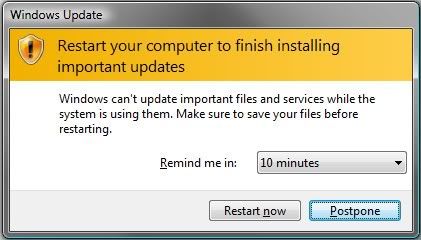
Auto-Restart dialog box

After downloading and installing an update from Windows Update, a window constantly pops up nagging you to restart, and even counting down to an automatic restart.
In Windows 7, Windows Vista and Windows XP, after installing downloaded updates via Windows Update manually or scheduled Automatic Updates automatically, the system will ask to auto-restart to apply all the updates.

Windows 7 has the option to allow users to postpone or delay the restart, the computer will still automatically reboot sometime later, if the updates required reboot to complete the installation.
If the system is has running an important task and cannot be restarted right now then you may stop rebooting after the updates are installed. You can change this feature of Auto-restart/Auto-reboot in group policy so that you will not be interrupted while working.

Click image to enlarge


Local Group Policy Editor

Here are the procedure to enable / disable the auto-restart feature:
Group Policy setting:
  1. Click Start -> Run
  2. Enter “gpedit.msc
  3. Go to Local Computer Policy -> Computer Configuration -> Administrative Templates –> Windows Components -> Windows Update
  4. Double-click on “No auto-restart for scheduled Automatic Update installation
  5. Disable or Enable it.
  6. Reboot the computer.
Click image to enlarge
No auto-restart for scheduled Automatic Update installation

You can also change the default setting of “Re-prompt for restart with scheduled installations” to remind you once a day, or so if you can still stand these pop-ups.

Photobucket
Re-prompt for restart with scheduled installations

Registry Editor setting:
This setting can be changed through registry with the following registry key and value.
  1. Run Registry Editor (RegEdit). Type regedit in RUN box from start menu.
  2. Go to Navigate to the following registry key: HKEY_LOCAL_MACHINE\Software\Policies\Microsoft\Windows\WindowsUpdate\AU
  3. Change the NoAutoRebootWithLoggedOnUsers (If the key does not exist, create new one with this name) DWORD (32-bit) Value to 1 to disallow auto-reboot. By default, the value is 0 which allow auto-reboot.
  4. Close registry editor.
When the policy is enabled, Automatic Updates will wait for the computer to be restarted by any user who is logged on, and not restart automatically. And Windows will not notify users that a restart is required to apply the updates.

Note:
This article is applicable for: Windows XP, Windows Server 2003, Vista, Server 2008,  Windows 7,  Server 2008 R2 and later.
References:
http://support.microsoft.com/kb/328010

Friday, July 2, 2010

List your favorite softwares and tools here

Bookmark and Share
What's your say ???
List your favorite softwares and tools here

Tell me about your favorite softwares and tools

Hello Bloggers and Compter users, Here I'm asking you all about the favorite software and tools you like in for your PC / Laptop / Server.

Tell me in this article through the comment form or by email: [bcdalai2020[at]gmail[dot]com]


Whatever the program may be anything like (example):

Operating Systems, Anti-Spyware, Anti-Virus/Firewall, System Tools, Cleaner Tools, Drivers, Internet Tools, Firewalls, Graphics & Design, MultiMedia, Desktop, CD/DVD Tools, Office/Business, File Tools, Programming, PDF, PHOTO Tools, VIDEO Tools, MP3 & AUDIO, Convertes, Backup/Recovery, Utilities Tools, Networking, And Other Tools. 


Tell me about your favorite softwares and tools

Special Notes:
Based on your feedback - When you are telling your likes and dislikes, then I'll review that particular apps on this blog. If any problem or issue discovered then, I'll analyze and troubleshoot here.


So come on and talk to me.


So, What's your say ???


--------------------------
Kindle Wireless Reading Device, Free 3G, 6" Display, White, 3G Works Globally - Latest Generation

Wednesday, December 31, 2008

Windows Common FAQs-01

Bookmark and Share
Windows Common FAQs-001
Here are some common windows FAQs for everyone. Read and tell me if you know more like these. Enjoy.
Alternative User Input
01- What is “Ctfmon.exe” and why it is always starting with windows startup programs and office programs?Solution: Ctfmon.exe is a file that is used for the Alternative User Input and the Office Language Bar in MS-Office XP or Higher versions. It monitors the activities of office and windows and provides “Text Input Service” support for Speech Recognition, Handwriting Recognition, Keyboard, Translation and other Alternative User Input technologies. Removing or deleting this file might cause problems for your Office programs. However if you still want to remove it then proceed.
The procedure to remove is: Open Add or Remove Programs, select the MS office click ‘Change’ button, now the Office XP Installer will run. Go to the Maintenance Mode Options >Add/Remove features. Here, choose the Installation option for all Office applications and tools and (Custom Setup> Choose “Advanced Customization of Applications” in case of Office 2003) select “Office Shared Features” expand that list, in which you can remove Alternative User Input (right click and select 'Not Available' then click update button).This will uninstall the Alternative User Input and will not start the file “Ctfmon.exe”.
DOH: It is recommended that you don’t remove it for smooth working of office programs.

Keyboard Settings02- I have installed Windows XP in my computer. In MS Word, the numeric keys and other special symbol keys were not working properly—they seem to have become jumbled up. For example, when I press [#], [@], [~], [“”] it shows the symbols £, ”, ¬, @ respectively. What is the reason?Solution: Whenever you face this type of situations you should think that this is a setting changed in the Regional and Language Options. To fix this, go to Control Panel > Regional and Language Options. In the Languages tab click Details button, then in the Text Services and Input Languages dialog box change the Default input language to (English-US) and press OK. Here, your default keyboard will be set to US instead of any other language. After finishing these settings restart computer and see the result.

Installing Windows XP in DOS mode:03- My PC has Windows 98 SE, but I want to upgrade to Windows XP Pro. I was unable to install Windows XP Professional in the MS-DOS mode. What is the way to install XP from DOS?Solution: 1- It seems that the Windows XP CD that you have is not bootable CD. If your CD is bootable, then boot your PC from CD. Re-start your PC and press [Del] or [F2] or [F12], depending upon your motherboard to enter the CMOS settings. Change the CD-ROM as first boot device and harddisk as second boot device. Don’t disable harddisk, press F10 to save the settings and exit. Now boot your PC using the Windows XP CD. Follow the screen to install XP.
2- If the CD is not bootable then start the computer in DOS mode. Now install Windows XP by executing the winnt.exe within the i386 folder on the Windows XP CD. This will start the Windows XP installation. Then follow the screen.

XP Startup disk04- My PC runs on Windows XP Professional. I want to create a Startup Disk, how and where can I create a XP startup disk or bootable floppy?
Solution: To create a boot floppy for Windows XP, format it first from Windows XP by right click the floppy icon from explorer then select format. In the format dialog box select “Create an MS-DOS startup disk” then click start and it will create the start disk.

Error Reporting:05- If any program causes a fatal error, Windows XP is asking me if I want to send a report to Microsoft, which is good feature to report the problems to Microsoft. But if a specific program create a serious error and hangs repeatedly then the Error Reporting dialog is very annoying. How to ignore/stop this?
Solution: Allowing Windows XP to send the error report to Microsoft has some advantages to it—it helps the company develop patches to make the OS more compatible with applications. But if this is happening too often, you can disable it. Open Command Prompt, type control sysdm.cpl, system, 3 or open “System property” from control panel select “Advance” tab. Click Error Reporting and disable error reporting. If a specific application causes a lot of errors, you can disable error reporting by adding that specific program to the “choose Programs” lists to ignore.

Removing Windows Messenger:06- I don’t use the Windows Messenger, so want to stop it from auto start with windows. Also I want to uninstall it permanently. But in Windows XP there is no entry for Windows Messenger in the Add/Remove programs lists. How can I remove this program from Windows?Solution: Issue this command from RUN dialog box or from command prompt. This will completely remove the Windows Messenger from your system.
RunDll32 advpack.dll,LaunchINFSection %WinDir%\INF\msmsgs.inf,BLC.Remove
Step 2: To remove MSN Messenger from Windows XP, open the file sysoc.inf from %SystemRoot%\INF folder in Notepad and go to the line, “msmsgs=msgrocm.dll,OcEntry,msmsgs.inf,hide,7”. Remove the word ‘hide’ from this line and save the file. Now you will now be able to see MSN Messenger in the Add/Remove Windows components list. And can able to uninstall it.
Note: If you wish to use it later then download the latest version of “Windows Live messenger” and Install from http://www.microsoft.com/.

Unable to read help files (e.g. “.chm” and “.hlp” files):07- In my Windows XP SP2 system I am unable to use the Help files from any program in my PC. I tried opening the *.chm help files but I get an error that the file cannot be found, even though it is present.Solution: The help engine (i.e. winhlp32.exe and hh.exe) of your OS is corrupted.
Step-1 Restore Help Engine with this command:
regsvr32 hhctrl.ocx
Step-2 Reinstall Help and Support Service with this Command:
Rundll32 setupapi.dll,InstallHinfSection DefaultInstall 132 %WinDir%\inf\pchealth.inf
Step-3 There might also be corrupt Internet Explorer files present. So, update your Internet Explorer. This will replace winhlp32.exe, and the corresponding files.
Reinstall Internet Explorer with this Command:
Rundll32 setupapi,InstallHinfSection DefaultInstall 132 %WinDir%\inf\ie.inf

Repairing Windows from Linux boot loader:08- My computer has both Windows XP and Linux. The Linux OS get damaged and didn’t run. So I manually deleted all the partitions of Linux. But still I get the initial dual boot screen i.e. Linux boot loader. How can I remove this?Solution: Start the computer with Windows XP CD and go to recovery console by pressing R on the first screen. Then follows the instruction to logon to your windows installation. At the command prompt issue the command fdisk /mbr, then type exit to reboot. This will remove the dual boot screen.

“Error: unmountable_boot_volume”:09- If you get the error “unmountable_boot_volume” and the screen displayed on blue screen, when you are booting from or installing Windows XP, the following are the reasons and solutions:1- Error at the time of booting.
Solution: This problem occurs when you have a corrupted boot.ini file. Boot up using the Window XP CD. Press [R] when you get the Setup screen, to get to a DOS-like mode. Here, type chkdsk /p and press [Enter]. After it is done, type fixboot, press [Enter] and then [y] and then again press [Enter]. After this, type exit to reboot to Windows. This should solve your problem. If it doesn’t, boot into the CD again. Type chkdsk /r to switch to the recovery mode. When it is finished type exit to reboot to Windows. This should definitely help you out.
2- Error at the time of Installing:
Solution: If this problem occurred at the time of installing windows, then remove the hardware creating problem e.g. graphics card, sound card or other devices that are not required for installing Windows. Or Use an 80-conductor cable for connecting UDMA drives, instead the standard 40-conductor cable. In the BIOS settings for your computer, load the ‘Fail-Safe’ default settings and then set the most frequently used options such as USB Support.

Delayed system startup10- The problem is that my windows machine takes a very long time to boot up.Solution: Anytime an operating system is booting up, it requires time to load device drivers, start-up programs, etc. The loading time is further dependent on devices being initialized by their drivers. Sometimes a slow device such as an external modem can increase boot up time. Windows XP is a much faster than the previous versions of windows. To reduce the boot up time, you can use tweaking utilities such as bootvis, from http://www.microsoft.com/. You can use third party system tuning or system tweaking software for this purpose, but it requires some knowledge and tweaking.

No Picture in MS-Word11- I am using Microsoft Office. When I’m trying to insert images in word, only a thick black border appears. However, I can insert images in all the Office other programs and they appear fine.Solution: You need to do is open the Word and go to Tools > Options > Picture Placeholders. Uncheck this option and you will now be able to view the inserted images in the document.

Windows Installer problem in Microsoft Office
12- Whenever I try to open Microsoft Word, the Windows Installer starts up and run for while and closes automatically. Why does it happen so?Solution: If Microsoft Office installation was done under a different user profile. Then this is normal as different profiles require some additional files to be installed. Let the Installer come up and add whatever files it needs. It generally happens if you access a function in Word that has been set for install on first use.
Once it finishes installing the required files, it should not pop up again when you open Word.
If the windows installer runs frequently whenever you run office applications. Then you have to install all office components completely. Open Add or Remove Programs; select the MS office click ‘Change’ button, now the Office XP Installer will run. Go to the Maintenance Mode Options >Add/Remove features. Here, choose the Installation option for all Office applications and tools and (Custom Setup> Choose “Advanced Customization of Applications” in case of Office 2003) select 'Office Shared Features’ right click and select “This feature and all subfeature, will be installed on local harddisk” then click next/update button. This will install the all subfeatures to your computer.

Non-administrator Burning Issue
13- How can I run the Burning software to burn CD/DVDs with a user account that does not have Administrator rights in Windows 2000, XP or 2003?Solution: First install the Burning software (e.g. Nero/Ashampoo Burning Studio) using an Administrator account. Then open registry, Go to Start Menu > Run type regedit press enter. Navigate to [HKEY_LOCAL_MACHINE\SOFTWARE\Microsoft\Windows NT\CurrentVersion\Winlogon] edit the value of the string value "allocatecdroms” from 0 to 1. Close the Registry editor and restart. Now you can burn CD/DVD using Limited user account.

Uninstalling games in Windows 2000.14- How do I uninstall the default games that come with Windows 2000 Professional?Solution: Open the Sysoc.inf file in notepad from “C:\winnt\inf\”. Remove the word “HIDE” from these lines ‘Games=ocgen.dll,OcEntry,games.inf,HIDE,7’ and ‘AccessUtil=ocgen.dll,OcEntry,accessor.inf,HIDE,7’, and save the file. Next, go to Add/Remove Programs > Windows Setup > Accessories and Utilities, de-select the Games option you want to remove and click Apply.

Accessing the SFC utility.15- I recently installed Windows 2000 and tried to run SFC (System File Checker), but it didn’t start. How can I access/use SFC utility in Windows 2000?
Solution: Unlike windows 98/ME, Windows 2000 or higher versions have a DOS-based SFC. To start it, go to the command prompt, type ‘sfc’ and press [Enter]. Here, you’ll find some help on how to use sfc. Use appropriate syntax to use sfc as per your necessity.

Errors running applet in Internet Explorer.16- I am unable to run Java APPLET in IE. When I run a Java applet in IE it says,” Your browser is completely ignoring the applet tag!" How can I run my applet/Java file through IE?Solution: It seems that your system don’t have “JRE” (i.e. Java Runtime Environment) installed Download and install latest release of JRE from http://java.sun.com/.

Disc Image files:
17- How can I use CD image files without burning into them CD?
Solution: Generally the data of CD/DVD are stored in disc images for distribution/downloading. The images are saved in different image formats such as: ISO, NRG, B5T, B6T, BWT, CCD, CUE, ISZ, MDS, PDI, CDI etc. There are many applications that open ISO files. Some of them are: Alcohol120%, Daemon Tools, WinISO, UltraISO etc. and also with WinRAR you can see the contents of ISO images only.

----------------------------

Saturday, March 1, 2008

Office 2003 SP3 error on Windows XP SP3

Bookmark and Share
Office 2003 SP3 installation error on Windows XP SP3
Last updated on: 30th May 2008

This the most frustrating error message here on Office 2003 installation.
See this figure below:
click here to maximise this picture
The error message reads as:

The system cannot read from the specified device.
With Retry and Cancel buttons.

Error details:
This error occurred while installing Office 2003 package with Office 2003 Service Pack 3 integrated on Windows XP professional with Service pack 3 build 3244 integrated. In both the packages the service packs are integrated with the installation file. Note: Please note that Windows Service Pack 3 comes with Windows Installer 3.1(KB893803), so no need to install it before installing Office.

[See here for office/windows service pack integration methods.]

Results:
Cannot install this office package with this Windows version. (XP SP3 build 3244)

Proof:
This office package is installing successfully on other windows versions i.e. XP sp2, Windows 2003 versions etc.

Corrections:
See the solution section section to see the solution.
Another possibility is that this problem may not occure in the latest builds of the service pack 3 for Windows XP, but there is no guarantee for this particular problem, if Microsoft will not think it as a serious problem.

Solution:
As the latest information this problem: The error happened due to wrong or faulty integration of Office service pack to the office installation files, but not because of Windows XP Service Pack 3. to integrate office service packs with office installation correctly read the article here or download the article now.

To know more about/download the latest version of Windows XP Service Pack read the article here.

Reported by: bcdalai
----------------------

Tuesday, December 18, 2007

Cannot Install IE7 Error Message

Bookmark and Share
Unable to Install Internet Explorer 7 on Windows


This is the error message shown by Internet Explorer 7 at the time of installation.

Problem:
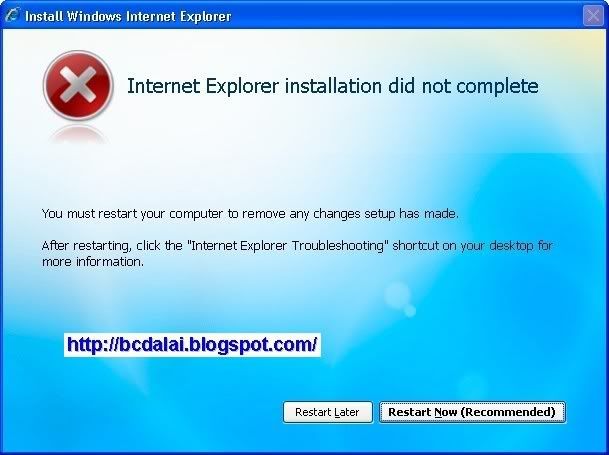
If you are trying to install the IE7 on Windows XP with Service Pack 2 or Service Pack 3 RC or in other versions of Windows. In the installation process you will see that it passes the WGA check, but the installation fails at the end and the error message like below image will appear. This problem may occur in other version of windows, because the reason is specific.
Error Message
Error Message
The following error message will appear:

Internet Explorer 7 could not be installed. You must restart your system to confirm that any changes to your system are undone.
After you restart, you will see the "Internet Explorer Troubleshooting" shortcut on your desktop.

If you will open it then it will link to the Knowledge Base(KB) artice 917925. In that article, the following two causes are mentioned:
• Permissions for one or more registry subkeys or for files on the computer are restricted in a way that prevents the update of those registry subkeys or computer files. A failure to update a registry key or a computer file may cause the Setup program to fail.
• Something has caused the computer not to trust the Internet Explorer 7 installation package.

But the reasons and troubleshooting methods mentioned here correct but not sufficient to this type of problems. Read following paragraph to find out the actual cause.

Actual Cause:
1- If you are using a pirated version of Windows that does not pass Windows Genuine Advantage test.
2- If you product ID is invalid for installing fo internet Explorer 7 installation.
3- Sometimes it may pass WGA test but will fail to install
4- If you have Windows XP with Service Pack 3 RC is installed.
5- This is because the version of IE7 you are using is released before 4th October 2007.
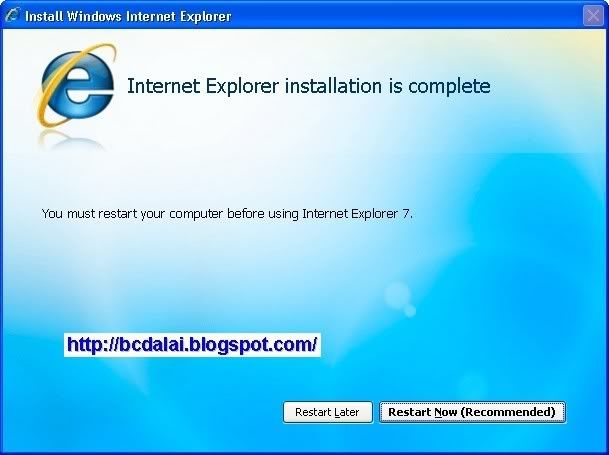
Actual Successful install message
Solution:
Don't worry download and install the latest version of Internet Explorer 7 from microsoft.com or use the version of Internet Explorer 7 released after 4th October 2007. The size of that downloaded file is 14.7 MB as compared to 14.8 MB that released before 4th October 2007. And there will be no problem at the time of install.


Applies To: All versions of Microsoft Windows where you can install the Internet Explorer 7.

Download IE7 for Windows XP SP2 or SP3 NOW. Or go to IE7 download page.

Troubleshoot Article By: bcdalai

------------------------------------
References:
http://bcdalai.blogspot.com/2008/03/internet-explorer-8.html
http://bcdalai.blogspot.com/2010/01/windows-command-guide-2010.html